[DRAFT] SVN x GIT - Pratical Aspects
Centralized VS Distributed
Centralized
- The repository is located on a remote server where all operations are performed.
- When the user checks out a directory from the repository it gets only the files, with minimal versioning information.

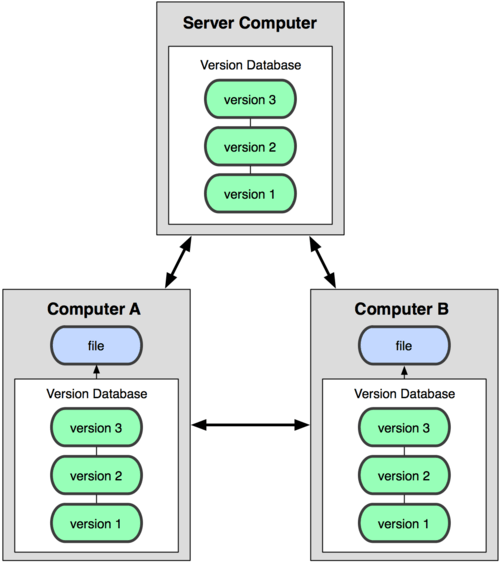
Distributed
- Every developer got a full copy of the repository stored locally where most of the operations are performed;
- The local repository can point to one or more remote repositories where the work can be shared with other developers.
Space Consumption
Knowing that when one developer clone a GIT repository it actually gets a full copy of the repository, a concern may arise in terms os local disk space consumption. Well, while you may have more data stored in your disk all the GIT database is compressed and highly optimized which means that the local repository will occupy less space in disk than one may think.
When you checkout a folder from a subversion repository you end up with 2 uncompressed versions of the folder locally, your working copy and the snapshot of the last revision, the one you checked out, of the folder. SVN does that to allow the developer to make diffs between the working copy and the last revision locally without needing to go to the server.
We can compare the two options to see which has the biggest size, that can be done importing an existing SVN repository to a GIT repository using the GIT-SVN tool and then compares sizes of the folders.
For this example it was considered the Phoenix repository and a commom operation:
- Clone of the imported git repository;
- Checkout of the trunk from SVN.
IDK if this part will be featured on the final presentation, I’ve found some problems with the repo import. I’ll redoing the proccess to double check the data <<<<EXAMPLE - PHOENIX REPO>>>> 1.04 GB VS 781 MB
Repository structure
On subversion you have a tree model with just one branch where the revisions are stored sequentially.
GIT uses a Graph structure where each commit is a node that knows every of its parents. The commit is the central piece on the git repository.
Branches
For SVN branches are just another directory on the repository with its own history information. You can merge revisions between branches but they are still treated as separated entities. Because of the centralized nature of SVN all branches are remote and public. The administrator can restrict the access to the branch to a certain group of developers, but still, the branch is located on the server.
On git a branch is basically a named pointer for a specific commit on the tree, because of that nature branches are very cheap for the system. Branches can be only local or can be published to a remote repository for collaboration with other developers. Every new copy of the repository, cloned from a remote repository, is treated as a new local branch of the main repository, that means that every developer repository is an isolated entity and the work on that local repository does not interfere with other developers work until it is pushed to the shared repository and pulled by the others.
Tags
Tags and branches are very similar in both systems. For SVN a TAG is just another folder in the main repository, that shouldn’t receive any update and remain static, that can be achieved using access restrictions on the new tag.
On git a tag is a static pointer to a specific commit. Unlike the branch pointer, the tag pointer is static, which means that it cannot be moved to another commit.
Security
SVN offers a more granular security control, you can have different access rights for each folder on your repository, remember that tags and branches are also folders, which if perfect for a top-down management.
GIT security is repository-wise, you can allow or revoke access of a user to the whole repository only. You can apply read-only access to certain branches also, but for the whole repository, never to a single folder or file.
Commits
Every commit on SVN creates a new revision to the remote repository, that means that to be able to commit some changes to the code the developer need to have access to the main repository.
On git the commit is happening locally, so the developer does not need to have access to the remote. The work can be committed locally and then when the developer gains access to the remote repository, it can push all the commits at once.
Main workflow advantages
Some of the main advantages of the development workflow that git can provide are:
- Commit often - Due to the distributed version of git it makes possible for a developer to commit his work as often as he likes without risking breaking other developers code and maintaining a more detailed history of the work performed.
- Branching workflow - Since branches are lightweight and can be only local the developer may work on the code on a separate branch and then solve all the merge conflicts locally on a complete separated context from other developers code. Most of the git workflows take advantage of its branching model using separate and/or temporary branches for different kinds of work.
- Pull requests - Git offers the option to create a pull request between branches, this means that the work will only be merge on the destination branch if it gets approved. This feature helps a lot with code reviews and release of new versions of the application.
- Peer-To-Peer - Every clone of the repository is a full repository, so you can add any copy of the repository as a remote for your local copy. This allows developers to share branches (e.g.: Experimental Branches) without the need to push it to the server.